Over the past 90 days, Trunetto reviewed troubleshooting demand across a wide range of smart home categories, including robot vacuums
Disclosure: This post may contain affiliate links. If you buy through these links, Trunetto may earn a commission at no extra cost to you.
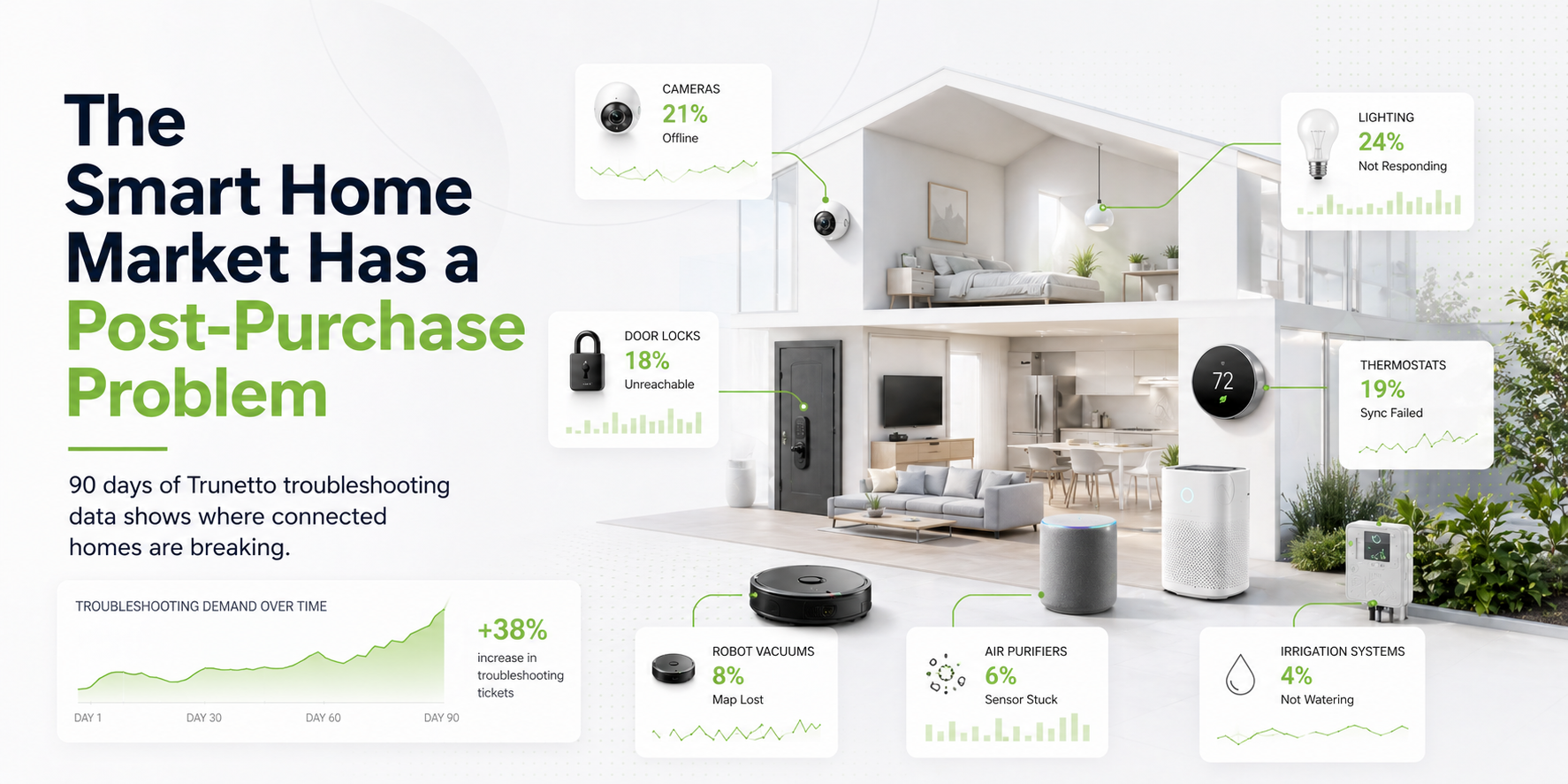
Over the past 90 days, Trunetto reviewed troubleshooting demand across a wide range of smart home categories, including robot vacuums, smart lighting, security cameras, smart locks, irrigation systems, thermostats, air purifiers, hubs, sensors, plugs, and streaming devices.
The goal of this review is simple: to better understand what types of smart home issues consumers are actively searching for after purchasing and using connected devices.
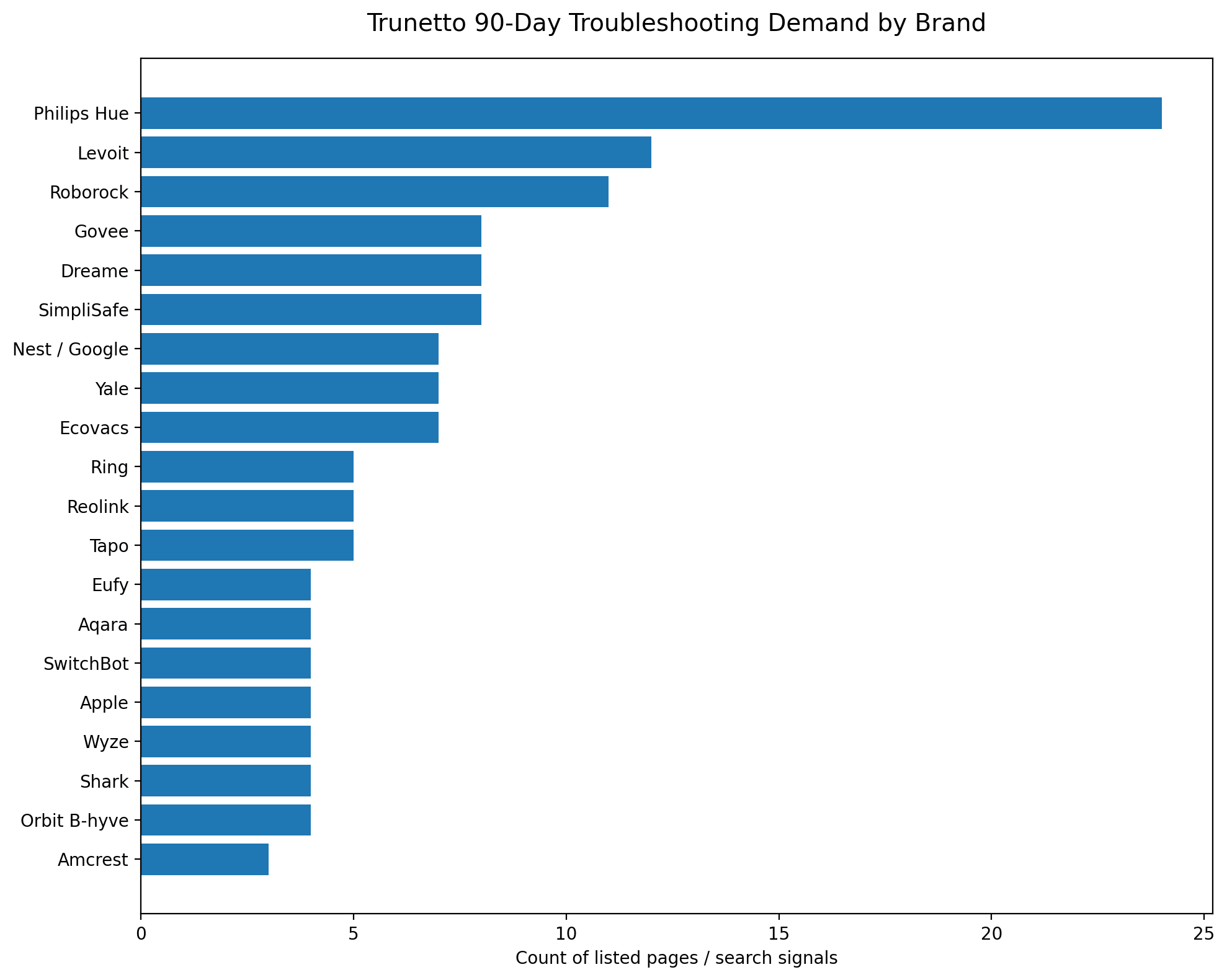
This report does not attempt to rank brands by product quality, reliability, market share, or customer satisfaction. The data reflects troubleshooting demand visible through Trunetto page activity and search signals during the reviewed period.
In other words, this is a snapshot of the types of smart home problems people are trying to solve, not a judgment on any individual brand or device.
Key Takeaway
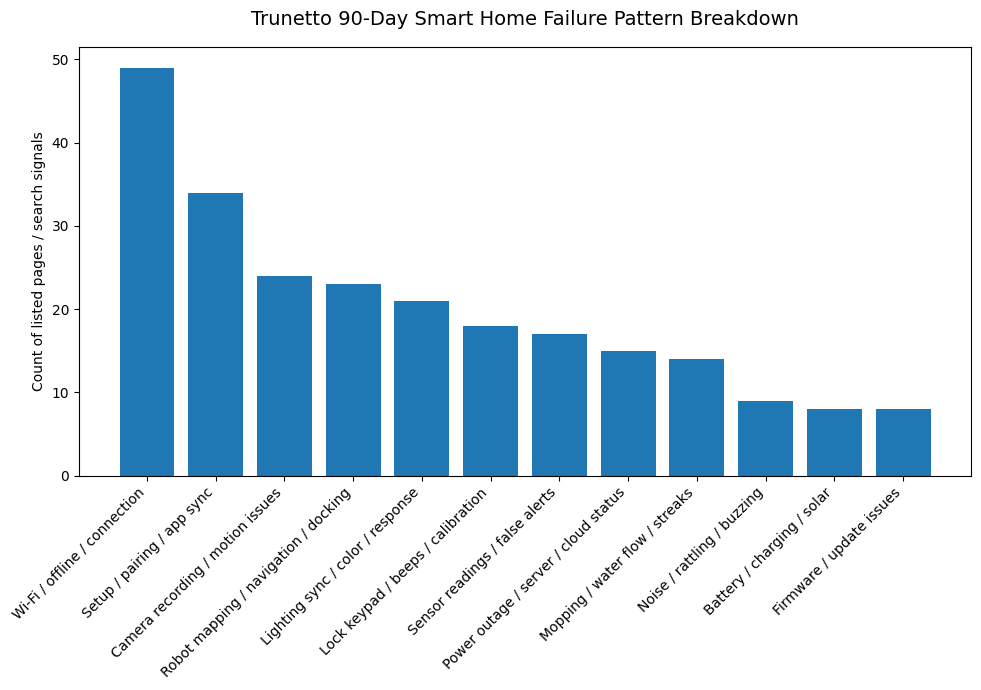
The strongest pattern in the data is that many smart home searches happen after purchase, when users are trying to resolve setup, connectivity, syncing, mapping, sensor, recording, battery, or device-response issues.
This suggests that post-purchase support content remains an important part of the smart home ownership experience.
Consumers are not only looking for product comparisons or buying guides. They are also looking for clear answers once a device is installed, connected, updated, moved, reset, or affected by a home network change.
Top Troubleshooting Categories in the Reviewed Data
Across the reviewed data, robot vacuums generated the highest number of troubleshooting signals among the listed smart home categories.
Other categories with noticeable troubleshooting activity included smart lighting, security cameras, smart locks, air purifiers, smart irrigation, smart hubs, smart thermostats, home security devices, smart plugs, streaming devices, sensors, smart plumbing, smart blinds, video doorbells, and garage door devices.
This does not necessarily mean these categories are less reliable than others. Higher troubleshooting demand can be influenced by many factors, including category popularity, device complexity, installed base, seasonality, consumer search behavior, number of available Trunetto pages, and the kinds of problems users are most likely to search for online.
Robot Vacuums Show Strong Ownership-Stage Search Demand
Robot vacuums appeared frequently in the reviewed data, especially around mapping, docking, mopping, water flow, navigation, and app connection topics.
Examples of common robot vacuum troubleshooting themes included missing or reset maps, rooms not saving correctly, mops leaving streaks, water not dispensing, devices not returning to the dock, LiDAR or navigation errors, brush issues, and cleaning routes that do not cover the full home.
This level of search activity likely reflects the complexity of modern robot vacuums. Many current models include room mapping, app-based controls, sensors, docking stations, mop systems, water tanks, firmware updates, and scheduled automations.
Because these products combine hardware, software, mapping logic, cleaning mechanics, and home Wi-Fi connectivity, users may search for detailed troubleshooting steps when performance changes or when expected behavior does not occur.
Connectivity Remains a Common Troubleshooting Theme
One of the most consistent patterns across categories was demand related to Wi-Fi, offline devices, app syncing, pairing, and network-related issues.
This appeared across several types of smart home products, including cameras, thermostats, hubs, lighting systems, plugs, sensors, locks, air purifiers, and irrigation controllers.
Connectivity-related troubleshooting can be affected by many normal household variables. These may include router changes, password updates, mesh network behavior, 2.4 GHz and 5 GHz network settings, firmware updates, app updates, cloud service status, device distance from the router, interference, or power interruptions.
Because smart home devices often depend on multiple layers working together, users may need help identifying whether the issue is related to the device, the mobile app, the home network, a cloud service, an ecosystem integration, or a local setting.
Smart Lighting Searches Often Involve Syncing, Setup, and Response Issues
Smart lighting also showed meaningful troubleshooting demand in the reviewed data.
Common themes included lights not responding, setup problems, bridge or hub issues, sync box signal problems, color mismatches, firmware update behavior, entertainment-area lag, bulbs turning on unexpectedly, and lights becoming unreachable after a power outage.
Smart lighting systems can include several different connection models, including Wi-Fi, Bluetooth, Zigbee, Matter, bridges, HDMI sync devices, mobile apps, voice assistants, and smart home ecosystem integrations.
Because of that, troubleshooting smart lighting may require different steps depending on whether the issue is with a bulb, bridge, app, sync device, automation, ecosystem connection, or local power state.
Security Cameras and Home Security Searches Often Reflect High-Intent Support Needs
Security cameras, video doorbells, smart locks, and home security systems also appeared in the reviewed troubleshooting data.
Common themes included cameras going offline, remote viewing issues, missing recordings, motion detection problems, night vision issues, firmware-related searches, battery or charging questions, warning lights, keypad issues, lock calibration, and beep-code interpretation.
These searches are often practical and time-sensitive because users may rely on these devices for home monitoring, access control, alerts, or visibility into events around the home.
For this reason, clear troubleshooting information can be especially useful in security-related categories. Users often need to understand what a warning means, what basic checks to run, when to contact support, and when a device, setting, battery, network connection, or installation condition may need attention.
Smart Irrigation Searches Show Seasonal and Reliability-Related Support Needs
Smart irrigation appeared in the data through searches and page activity related to hubs, timers, watering schedules, skipped zones, offline devices, power events, and server-status-style queries.
Smart irrigation devices often depend on schedules, zones, valves, app settings, weather adjustments, Wi-Fi connectivity, power stability, and sometimes cloud-based services.
When a watering schedule does not run as expected, users may need help narrowing down the cause. The issue may be related to the controller, hub, app schedule, valve wiring, zone configuration, rain delay settings, power interruption, network status, or another environmental factor.
Because irrigation directly affects outdoor maintenance, clear troubleshooting guidance can help users determine whether an issue is a quick setting adjustment, a local hardware problem, or something that requires further support.
Air Purifier Searches Often Focus on Sensors, Odors, Noise, and App Connectivity
Air purifiers generated troubleshooting demand around air quality readings, sensor behavior, Wi-Fi connection, app pairing, filter changes, odors, fan behavior, and rattling or noise.
These searches suggest that users are often trying to understand both device operation and sensor interpretation.
For example, if an air purifier shows an unexpected air quality number, users may search to understand whether the sensor needs cleaning, whether the reading is normal, whether the device is reacting to a temporary condition, or whether the app or hardware needs attention.
Odor-related searches after a filter change may also reflect a need for clearer guidance around normal break-in smells, incorrect filter installation, packaging residue, old filters, or situations where support should be contacted.
Smart Locks Show Demand Around Batteries, Keypads, Calibration, and Codes
Smart locks appeared in the reviewed data through searches related to beep codes, battery drain, keypad issues, calibration, jamming, app connection, auto-lock behavior, and door-sensor alignment.
Smart lock troubleshooting can involve both electronic and physical factors. A lock may be affected by battery type, door alignment, strike plate position, calibration, firmware, app connection, keypad behavior, or environmental conditions.
Because smart locks are tied to home access, users often need straightforward information that helps them interpret alerts, regain access, check battery status, and determine whether the issue is with the lock hardware, door fit, app, or setup configuration.
Smart Hubs and Ecosystem Issues Remain Important
Smart hubs and ecosystem-related pages also appeared in the reviewed data.
Common topics included devices not showing in HomeKit, Matter pairing issues, hub setup problems, firmware updates, automations failing, sensors going offline, and devices not responding after setup or power changes.
These searches show how smart home support often extends beyond a single device.
Many users are managing multiple ecosystems, including Apple Home, Google Home, Alexa, SmartThings, Matter, Zigbee, Z-Wave, Wi-Fi, Bluetooth, and brand-specific apps. When a device does not appear, does not respond, or does not pair correctly, the issue may involve compatibility, permissions, firmware, network configuration, hub status, or ecosystem limitations.
What the Data Suggests About the Smart Home Ownership Experience
The reviewed data suggests that smart home ownership includes an ongoing support phase after the initial purchase and setup.
That support phase may include installation help, pairing support, Wi-Fi troubleshooting, app syncing, firmware updates, compatibility checks, battery replacement, sensor cleaning, device resets, part replacement, and professional installation or service when needed.
This does not mean smart home products are failing as a category. It means connected devices are now part of daily home infrastructure, and users expect them to be understandable, maintainable, and recoverable when something changes.
As smart home systems become more common, the need for clear, issue-specific troubleshooting information is likely to continue growing.
What This Means for Brands
For smart home brands, troubleshooting demand can provide useful insight into customer needs after purchase.
Search behavior can reveal where users may need clearer setup instructions, better error explanations, improved app messaging, stronger compatibility documentation, more visible support paths, or simpler explanations of common device behavior.
Issue-specific content can also help reduce confusion by explaining what users should check first, what symptoms mean, and when the next step should be contacting support, replacing a part, adjusting an installation, or reviewing network settings.
Brands that invest in clear post-purchase guidance may be able to improve customer confidence, reduce avoidable support friction, and help users get more value from the products they already own.
What This Means for Retailers, Affiliates, and Installers
For retailers, affiliates, and installers, the data highlights the importance of supporting users beyond the product comparison stage.
Consumers often need help after the purchase decision has already been made. In some cases, the solution may be a setting change, reset, cleaning step, firmware update, replacement filter, new battery, accessory, router improvement, compatible hub, or professional installation support.
Useful troubleshooting content can connect the user’s actual problem to the right next step without forcing every issue into a product recommendation.
That distinction matters. The most useful support content starts with the problem and only recommends products, parts, upgrades, or services when they are relevant to the issue.
Why Trunetto Tracks Troubleshooting Demand
Trunetto tracks troubleshooting demand to better understand where smart home users need practical support.
The smart home market includes many product categories, brands, ecosystems, and connection standards. As a result, users often need help translating a symptom into a likely cause and then into a reasonable next step.
By reviewing troubleshooting patterns, Trunetto can continue building guides, tools, product context, and support pathways around the issues users are actively trying to solve.
The objective is not to criticize brands or products. The objective is to make smart home ownership easier to understand.
Final Summary
The 90-day Trunetto data shows that smart home troubleshooting demand is spread across many categories, with notable activity around robot vacuums, smart lighting, cameras, locks, irrigation, thermostats, hubs, and air purifiers.
The most common themes include connectivity, setup, app syncing, mapping, recording, sensor readings, battery behavior, power events, and device response issues.
These patterns suggest that post-purchase support is a major part of the smart home experience.
As connected devices become more common in everyday homes, consumers will continue to need clear, neutral, and practical information that helps them diagnose problems, understand device behavior, and decide what to do next.
That is the role Trunetto is building toward: helping people make sense of the connected home after the device is already in the house.