How to Set Up Your Ring Alarm Security Kit
- Set Up the Base Station
- Add Components in the App
- Customize Device Settings
- Physically Install Sensors
Most users complete this in under 60 minutes
Overview
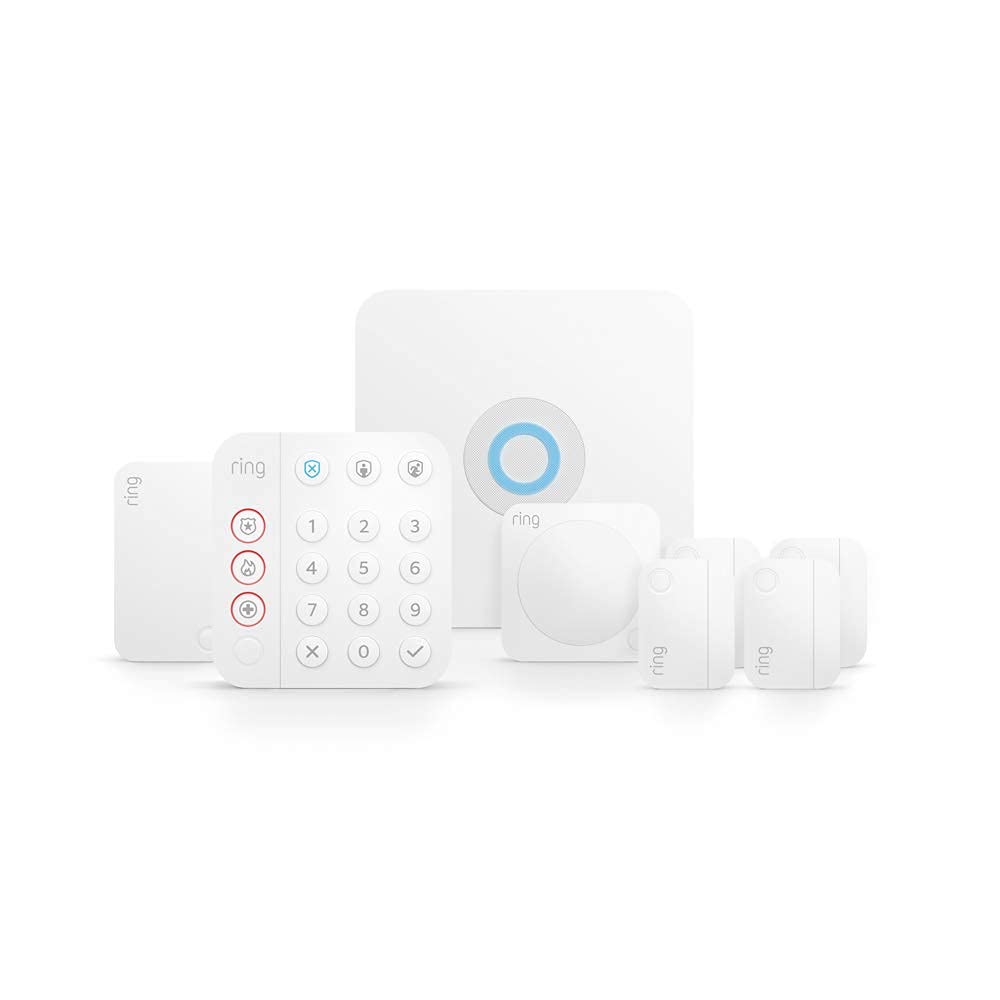
This guide details the setup of the Ring Alarm Security Kit (2nd Gen). It covers the initial setup of the Base Station, connecting the Keypad, and installing the various sensors like Contact Sensors, Motion Detectors, and the Range Extender for full home protection.
Why This Happens in Real Homes
Ring Alarm setup starts with the Base Station, which needs a stable internet connection (WiFi or Ethernet) and power, then you add the keypad, contact sensors, motion detectors, and range extender in order through the app. The range extender matters in larger homes to reach distant sensors.
Start by placing the Base Station centrally and getting it online, then add each device one at a time as the app prompts, testing each sensor. Professional or self-monitoring is a separate subscription choice; the alarm arms and chimes locally regardless, but monitoring and cellular backup need a plan.
What's Included
- Ring Alarm Base Station
- Keypad for arming and disarming
- Contact Sensors for doors/windows
- Motion Detector for room coverage
- Range Extender to boost signal
- Your smartphone with the Ring app
Got your materials ready? Here's what to check first.
Before You Start
- A stable internet connection (Wi-Fi/Ethernet)
- Smartphone with the Ring app installed
- Bluetooth enabled on your mobile device
- A nearby power outlet for the Base Station
- A Ring Protect subscription for monitoring
- All components from the kit ready to go
Don't skip this step — it breaks everything if you do
The Ring Alarm siren is extremely loud at 104 dB. Be prepared when testing the system.
Tools & Requirements
Installation Steps
Set Up the Base Station
Download the Ring app and create an account. In the app, select 'Set Up a Device', then 'Security', and 'Base Station'. Complete the setup prompts to connect the Base Station to your internet via Wi-Fi or Ethernet and plug it into a power outlet to begin.
Add Components in the App
Once the Base Station is online, use the Ring app to add your other components. Select 'Set Up a Device' for each one: Keypad, Contact Sensor, Motion Detector, and Range Extender. The app will guide you through pulling the battery tabs and pairing each device.
Customize Device Settings
After pairing each device, the Ring app will prompt you to customize its settings. Assign a specific name (e.g., 'Front Door Sensor') and a room to each component. This helps you easily identify which sensor is triggered when you receive an alert on your phone.
Physically Install Sensors
With all devices paired and configured, physically install them in their designated locations. Use the included mounting tape or screws to affix Contact Sensors to doors and windows, and place Motion Detectors in corners of rooms for the widest coverage area.
Installation Tips
Still stuck? This is usually the deeper cause below.
Take the Keypad with you as you install sensors to test each one immediately after installation.
Before you go — these Ring guides fix most remaining issues.
Most popular upgrades chosen by Ring Alarm Security Kit (2nd Gen) owners.

4 Channel 360° Dash Cam Front Rear Inside & Left Right,4K...

Ring Alarm 5-Piece Kit with Ring Indoor Cam 2nd Gen
As an Amazon Associate we earn from qualifying purchases.
Official Manufacturer Manual
If you need the complete manufacturer documentation for advanced setup, wiring diagrams, or detailed specifications, you can download the official manual below. The manual includes full technical instructions directly from the manufacturer and may help if your issue requires deeper troubleshooting.
Download the Official Ring Alarm Security Kit (2nd Gen) ManualSource: ring.com
Need More Help? Ring Support
Note: The contact information below connects you directly to Ring's official customer support team, not Trunetto. They can help with warranty claims, device replacements, and advanced technical issues.
How Does Ring Compare?
Before replacing your Ring device, see how it stacks up against alternatives in our full comparison guides.
Accessories owners commonly pair with Ring Alarm Security Kit (2nd Gen).

Ring Rechargeable Quick Release Battery Pack

Ring Floodlight Cam Plus with Plug-In Mount - Plug-in pow...

Ring Alarm Contact Sensor - 2nd Gen | Instant Window & Do...
As an Amazon Associate we earn from qualifying purchases.