

Why Won't My Kwikset 914 Z-Wave Status Update?
- No beaming-capable Z-Wave repeater near the door (locks are FLiRS devices)
- Lock too far from the hub with a weak Z-Wave route
- Dead or ghost nodes in the mesh disrupting routing
Problem Description
Your Kwikset SmartCode 914 Z-Wave shows a stale lock/unlock status in your hub or app - you operate it at the door but the hub keeps showing the old state, or it updates minutes late. Z-Wave locks are secure, battery-powered (FLiRS) devices that don't always push status instantly, so the fix is usually about the Z-Wave mesh: a beaming repeater near the door, re-interviewing the lock, or the hub polling it. This guide covers restoring accurate status reporting.
Why This Happens in Real Homes
A Kwikset 914 Z-Wave that shows the wrong status is almost always a mesh and reporting problem, not a broken lock. Battery-powered Z-Wave locks are FLiRS devices - they sleep to save power and rely on a nearby always-powered node that supports 'beaming' to wake them for commands and to relay their reports. If there's no beaming-capable repeater within range of the door, commands are slow and status updates arrive late or not at all, especially for manual keypad or thumbturn actions the lock has to volunteer. Adding a repeater near the entry is the single most effective fix.
Two other things commonly cause stale status. First, secure inclusion: locks should be added with S2 (or legacy S0) security, and a lock included without its proper security class often behaves erratically in reporting - excluding and re-including it cleanly resolves that. Second, the hub side: some hubs poll locks on an interval rather than getting instant pushes, so a manual unlock at the door won't show until the next poll unless polling is enabled and reasonably frequent. Round it out by removing ghost/dead nodes and running a Z-Wave network heal to rebuild routes, and by keeping fresh AA alkaline batteries in the lock, since a weak set drops the radio and makes reporting unreliable.
Symptoms
- Hub shows the wrong lock/unlock state
- Status updates minutes late or only after a manual refresh
- Manual keypad/thumbturn actions don't report to the hub
- Remote lock/unlock commands are slow or time out
- Status accurate only when the hub is nearby
- Lock drops off and rejoins the Z-Wave network
- Automations fire on stale status
- Battery reports look wrong or missing
Recognize these? Here's what usually causes it.
Common Causes
- No beaming-capable Z-Wave repeater near the door (locks are FLiRS devices)
- Lock too far from the hub with a weak Z-Wave route
- Dead or ghost nodes in the mesh disrupting routing
- Lock included without secure (S2/S0) class, limiting reporting
- Hub not polling the lock, so manual actions aren't reflected
- Low batteries weakening the Z-Wave radio
- Lock needs a re-interview after firmware/hub changes
- Z-Wave network needs a heal to rebuild routes
Most fixes happen in the first 3 steps.
Always keep a physical backup key accessible outside your home in case of total lock failure. Never perform a factory reset while locked out as this may disable all electronic access. Ensure battery level is above 50 percent before firmware updates to prevent corruption.
Tools & Requirements
These tools will help you complete this fix.

Level
9 Inch Torpedo Level Magnetic, Shock-Proof Small Lev...

Replacement batteries
Duracell Coppertop Double AA Batteries with Power Bo...
As an Amazon Associate we earn from qualifying purchases.
Step-by-Step Solution
Check the Z-Wave connection status on your hub
In your smart home hub app (SmartThings, Hubitat, Wink), find the Kwikset 914 lock and check its status. If it shows Offline or Unreachable, the Z-Wave connection between the lock and the hub is broken. The lock itself still works locally (keypad codes and key still unlock the door), but remote control and status updates do not work until the Z-Wave connection is restored.
Check the lock battery level
Low batteries on the Kwikset 914 cause the Z-Wave radio to become unreliable before the keypad stops working. The Z-Wave radio is the most power-hungry component. Replace all 4 AA batteries with fresh alkaline batteries even if the keypad still works. After replacing, check the hub app — the lock should report back online within a few minutes.
Needed for this step
9 Inch Torpedo Level Magnetic, Shock-Proof Smal...
This helps complete the fix you are currently reading.
$6.99Reduce the distance between the lock and the hub
Z-Wave has a range of about 30-40 feet indoors. If the lock is far from the hub with walls between them, the signal may not reach. Every mains-powered Z-Wave device (smart plugs, light switches, outlets) acts as a repeater in the Z-Wave mesh. Add a Z-Wave smart plug between the lock and the hub to extend the mesh. After adding the repeater, run a Z-Wave network repair on your hub to let the lock discover the new route.
Run a Z-Wave network repair
In your hub app, find the Z-Wave utilities or settings and run a network repair (also called a Z-Wave heal). This tells every Z-Wave device to rediscover its neighbors and build best routes. The repair can take 15-30 minutes. After it completes, check the lock status — it should show online with a stronger route. If the repair reports an error for the lock, the lock is out of range and needs a closer repeater.
Exclude and re-include the lock
If the lock remains offline after fresh batteries and a network repair, the Z-Wave pairing may be corrupted. Exclude the lock: put your hub in Z-Wave exclusion mode, then on the lock press the A button (interior) followed by the lock button. The hub confirms exclusion. Delete the old lock entry from the hub app. Then re-include: put the hub in inclusion mode, press A then lock on the lock. The lock re-pairs and appears as a new device. You will need to re-create any automations that used the old lock entry.
Needed for this step
Duracell Coppertop Double AA Batteries with Pow...
This helps complete the fix you are currently reading.
$6.96Quick Solutions
Still having issues? This is usually the deeper cause below.
If the device became unresponsive after a firmware update, a factory reset usually clears the corrupted state — the update itself is rarely the root cause.
Set up auto-lock to engage 30 seconds after the door closes so you never accidentally leave it unlocked. Create temporary access codes for guests and service workers that automatically expire after a set time period.
Mesh devices that drop repeatedly are almost always missing a repeater between hub and endpoint — initial pairing works because you held the devices close.
- No beaming-capable Z-Wave repeater near the door (locks are
- Lock too far from the hub with a weak
- Dead or ghost nodes in the mesh disrupting routing
- Lock included without secure (S2/S0) class, limiting reporting
- Hub not polling the lock, so manual actions aren't
Before you go — try one of these (they fix most cases).
Most popular upgrades chosen by Kwikset SmartCode 914 owners.
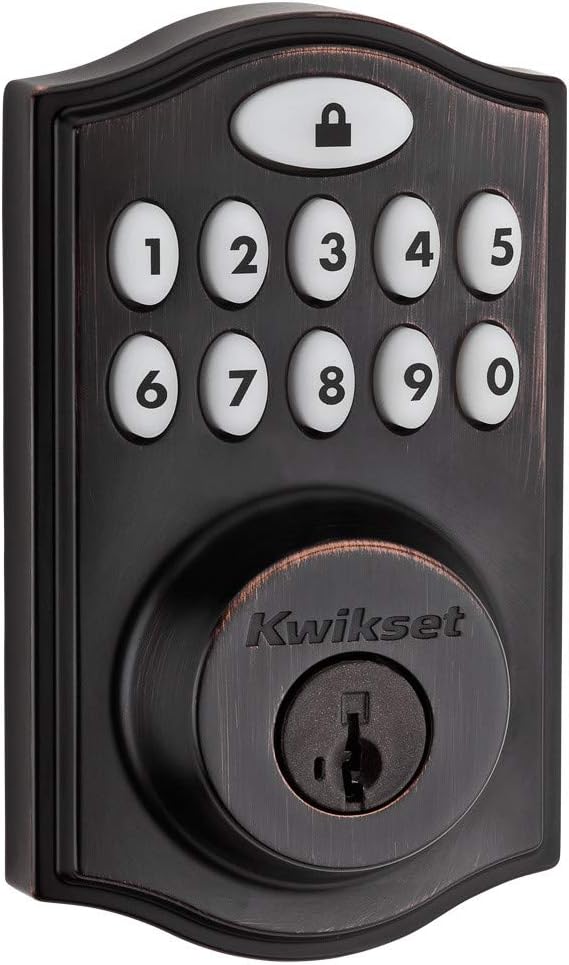
Kwikset 99140-024 SmartCode 914 Traditional Smart Lock Ke...

Kwikset 99140-023 SmartCode 914 Traditional Smart Lock Ke...
As an Amazon Associate we earn from qualifying purchases.
Official Manufacturer Manual
Kwikset provides official product documentation through their online manual rather than downloadable PDF. Access setup guides, troubleshooting steps, and product specifications for your Kwikset SmartCode 914.
Source: kwikset.com
Need More Help? Kwikset Support
Note: The contact information below connects you directly to Kwikset's official customer support team, not Trunetto. They can help with warranty claims, device replacements, and advanced technical issues.


