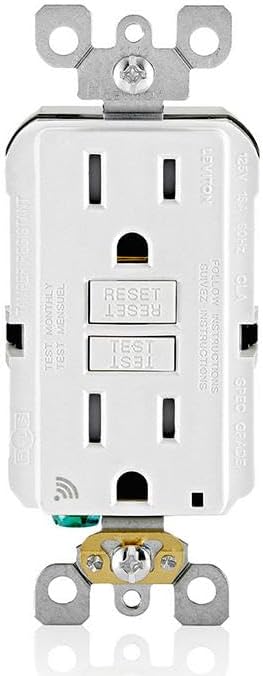
Why Does My Leviton GFCI Outlet Keep Tripping?
- A real ground fault from a connected device
- Moisture/water in the circuit or an outdoor box
- Worn/end-of-life GFCI failing its self-test
Problem Description
Your Leviton GFCI outlet keeps tripping and cutting power to downstream outlets. A GFCI (Ground Fault Circuit Interrupter) trips when it detects current leaking to ground — this is a safety feature, not a malfunction. Frequent tripping indicates a real ground fault from a connected device, moisture in the circuit, or a worn GFCI that needs replacement.
Why This Happens in Real Homes
A Leviton GFCI that keeps tripping is usually doing its job — it trips when it senses even a few milliamps of current leaking to ground, which is the exact condition that protects you from a shock. So frequent tripping most often means a real ground fault somewhere on the circuit: a failing appliance, or moisture in an outdoor or bathroom box after rain.
Find the fault by elimination: unplug everything the GFCI protects, reset it, and plug devices back one at a time until it trips — that isolates the culprit. Dry out and seal any wet boxes. Two wiring points matter: the incoming feed must land on the LINE terminals and downstream outlets on LOAD (reversing them causes odd tripping), and a shared neutral can nuisance-trip. Finally, GFCIs wear out — a modern unit runs a self-test and locks out (won't reset) at end of life, so a GFCI that won't stay reset with nothing plugged in usually just needs replacing.
Symptoms
- GFCI keeps tripping
- Downstream outlets lose power
- Trips immediately on reset
- Trips in wet weather
- Won't stay reset
- Nuisance tripping
- Trips when an appliance runs
- No power until reset
Recognize these? Here's what usually causes it.
Common Causes
- A real ground fault from a connected device
- Moisture/water in the circuit or an outdoor box
- Worn/end-of-life GFCI failing its self-test
- Shared neutral or miswired line/load terminals
- An appliance with leakage current
- Long circuit run causing accumulated leakage
- Overloaded or damaged downstream wiring
- Reversed line and load connections
Most fixes happen in the first 3 steps.
Never exceed the smart plug maximum wattage rating listed on the device or packaging. Do not use smart plugs with space heaters, high-wattage appliances, or devices that must not be interrupted like medical equipment. Smart plugs are not designed for outdoor use unless specifically rated for it.
Step-by-Step Solution
Understand how GFCI protection works
A Leviton GFCI outlet monitors the current flowing through the hot and neutral wires. If it detects a difference of 4-6 milliamps (indicating current leaking to ground — potentially through a person), it trips in 1/40th of a second, cutting power. GFCI outlets are required in kitchens, bathrooms, garages, basements, and outdoor locations. The Reset and Test buttons on the outlet face control the protection circuit.
Reset a tripped GFCI
When a GFCI trips, the power to the outlet (and any downstream outlets wired to it) shuts off. Press the Reset button firmly until it clicks. Power should restore. If the Reset button will not stay in when pressed: there is an active ground fault on the circuit. Unplug all devices from the GFCI outlet and any downstream outlets. Try resetting again. If it holds with nothing plugged in, one of the unplugged devices has a ground fault.
Test the GFCI monthly
Press the Test button — the outlet should click and cut power (the Reset button pops out). Then press Reset to restore power. If pressing Test does not cut power: the GFCI protection circuit has failed and the outlet must be replaced immediately. A GFCI that does not trip on test is not providing ground fault protection, even though it may still supply power.
Fix frequent nuisance tripping
If the GFCI trips repeatedly without an obvious cause: moisture in the outlet box (especially outdoor or basement outlets), a long circuit with many outlets (accumulated minor leakage adds up), or a failing appliance with a small ground leak. Hair dryers, space heaters, and old refrigerators commonly cause nuisance trips. Try each device individually to identify the culprit. If the GFCI trips with nothing plugged in: the outlet itself or the wiring has a problem — call an electrician.
Replace an old or failed GFCI
GFCI outlets have a lifespan of 10-15 years. An aging GFCI may trip frequently, fail the test button check, or not reset properly. Turn off the breaker, remove the old GFCI, and install a new Leviton GFCI. Connect the LINE wires (from the breaker) to the LINE terminals and LOAD wires (to downstream outlets) to the LOAD terminals. Reversing LINE and LOAD wires prevents the GFCI from protecting downstream outlets. After installation, test with the Test button.
Quick Solutions
Still having issues? This is usually the deeper cause below.
If this comes back after following these steps, check whether a recent app or firmware update reset a default setting — the fix works, but the setting gets reverted silently.
Use smart plugs with energy monitoring to track exactly how much electricity each appliance uses. Set up Away Mode schedules that randomly toggle lamps on and off to make your home look occupied when you are traveling.
This issue almost always looks more complex than it is — the majority of cases trace back to a single setting, a stale credential, or a default that shipped wrong.
- A real ground fault from a connected device
- Moisture/water in the circuit or an outdoor box
- Worn/end-of-life GFCI failing its self-test
- Shared neutral or miswired line/load terminals
- An appliance with leakage current
Before you go — try one of these (they fix most cases).
Most popular upgrades chosen by Leviton Smart GFCI owners.

As an Amazon Associate we earn from qualifying purchases.
Official Manufacturer Manual
Leviton provides official product documentation through their online manual rather than downloadable PDF. Access setup guides, troubleshooting steps, and product specifications for your Leviton Smart GFCI.
Source: leviton.com
Need More Help? Leviton Support
Note: The contact information below connects you directly to Leviton's official customer support team, not Trunetto. They can help with warranty claims, device replacements, and advanced technical issues.
Accessories owners commonly pair with Leviton Smart GFCI.

Leviton Decora Digital/Decora Smart Switch Color Change K...

Leviton Decora Digital/Decora Smart Switch Color Change K...

Leviton Decora Smart Switch, Wi-Fi 2nd Gen, Neutral Wire ...
As an Amazon Associate we earn from qualifying purchases.