

Why Is My Dyson Air Purifier Showing Inaccurate Air Quality Readings and Wrong Sensor Data
- Sensor inlet vents blocked by dust/debris
- Purifier too close to a wall, restricting sensor airflow
- Sensors need 24-48h to calibrate after first power-on
Problem Description
Your Dyson purifier displays air quality readings that seem wrong or inconsistent. The PM2.5, VOC, or NO2 levels shown on the LCD or in the Dyson Link app do not match actual conditions. Readings may be stuck at a constant value, show impossibly high numbers, or not respond when pollutants are introduced.
Why This Happens in Real Homes
Dyson purifiers measure air quality with a small cluster of sensors - a laser particle sensor for PM2.5/PM10, plus VOC and NO2 gas sensors (and formaldehyde on HP09/TP09) - and their accuracy depends heavily on clean, unobstructed airflow reaching them. The most common cause of stuck or wrong readings is the sensor inlet vents being clogged with fine dust, so a PM2.5 that reads zero in an obviously dusty room usually just needs the sensor ports cleaned with dry compressed air. Placement matters too: a purifier shoved against a wall starves the sensors of representative room air, so pulling it about three feet out often fixes readings that seem disconnected from reality.
Two behaviors get mistaken for faults. First, calibration: after a power cycle or first setup, the sensors need roughly 24-48 hours to settle, during which readings can look off. Second, VOC saturation: cleaning sprays, cooking, and fresh paint genuinely spike the VOC sensor, so a reading that stays high after such an event isn't wrong - it's detecting lingering VOCs, and ventilating the room clears it. If readings are still off after cleaning the sensors, giving the unit clearance, ventilating, and updating firmware, a factory reset of the sensors re-baselines them; a sensor that's truly failed (permanently pinned or unresponsive to a known source) needs Dyson service.
Symptoms
- PM2.5 stays at zero even in a visibly dusty room
- VOC sensor permanently shows high despite clean air
- Readings on the LCD differ from the Dyson app
- Sensor readings spike randomly with no change
- NO2 or formaldehyde readings seem unrealistic
- Air-quality color stays red when air smells clean
- Readings frozen at a constant value
- Sensors slow to respond to pollutants
Recognize these? Here's what usually causes it.
Common Causes
- Sensor inlet vents blocked by dust/debris
- Purifier too close to a wall, restricting sensor airflow
- Sensors need 24-48h to calibrate after first power-on
- Recent cleaning products/cooking saturating the VOC sensor
- Firmware not updated with sensor corrections
- Temperature/humidity extremes affecting accuracy
- Sensor ports clogged with fine dust
- Machine recently moved/power-cycled (recalibrating)
Most fixes happen in the first 3 steps.
Never spray liquid cleaners or water into sensor inlets. Moisture can permanently damage the PM2.5 laser sensor and void your warranty.
Tools & Requirements
These tools will help you complete this fix.

Compressed air can
Compressed Air Duster,130000RPM Electric Air Duster ...

microfiber cloth
BELLEMOND「Samurai Cloth」Japanese Microfiber Cleaning...
As an Amazon Associate we earn from qualifying purchases.
Step-by-Step Solution
Clean the Sensor Inlet
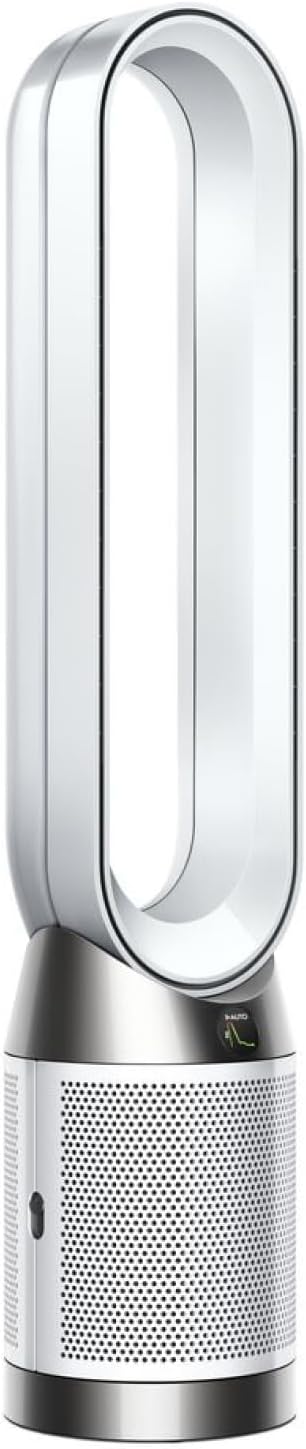
Locate the small sensor inlet slot on the lower-left side of the purifier base (when facing the front display). Use a can of compressed air to gently blow out any dust or debris from the sensor openings. Do not insert any objects into the holes. Wipe the exterior around the inlets with a dry microfiber cloth. Accumulated dust on these inlets is the most common cause of stuck or inaccurate readings.
Needed for this step
Compressed Air Duster,130000RPM Electric Air Du...
This helps complete the fix you are currently reading.
$20.99Reposition the Purifier
Move the purifier to a location at least 3 feet away from walls, furniture, and corners. Sensors need unrestricted airflow to take accurate ambient readings. Avoid placing the purifier near open windows, HVAC vents, kitchens, or bathrooms where temporary pollutant spikes can confuse the baseline calibration. The ideal position is in the center of the room you want to monitor.
Force Sensor Recalibration
Power off the purifier completely by unplugging it from the wall outlet. Wait 30 seconds, then plug it back in. The sensors will begin a fresh calibration cycle that takes 24 to 48 hours to establish an accurate baseline. During this period, readings may fluctuate more than normal. Do not power cycle the purifier again during calibration.
Update Firmware
Open the Dyson Link app and go to your purifier's settings page. Check for any available firmware updates and install them. Dyson periodically releases firmware updates that include sensor calibration improvements and accuracy corrections. The update process takes 5 to 10 minutes and the purifier must stay powered on throughout.
Compare and Verify Readings
After calibration completes, test the sensor accuracy by introducing a known pollutant source near the purifier. Lighting a match and blowing it out near the sensor inlet should cause PM2.5 readings to spike within 30 seconds. Opening a bottle of rubbing alcohol near the inlet should trigger a VOC increase. If sensors still do not respond to these tests, contact Dyson support for a possible hardware sensor fault.
Quick Solutions
Still having issues? This is usually the deeper cause below.
If this comes back after following these steps, check whether a recent app or firmware update reset a default setting — the fix works, but the setting gets reverted silently.
The Dyson Link app shows more detailed sensor history than the LCD screen. Check the 24-hour graph in the app to see if readings are trending correctly even if instantaneous values seem off.
Battery-related failures are almost always flagged too late — the device degrades silently for days before the app catches up to what's actually happening.
- Sensor inlet vents blocked by dust/debris
- Purifier too close to a wall, restricting sensor airflow
- Sensors need 24-48h to calibrate after first power-on
- Recent cleaning products/cooking saturating the VOC sensor
- Firmware not updated with sensor corrections
Before you go — try one of these (they fix most cases).
Most popular upgrades chosen by Dyson Air Purifier owners.
As an Amazon Associate we earn from qualifying purchases.
Official Manufacturer Manual
Dyson provides official product documentation through their online manual rather than downloadable PDF. Access setup guides, troubleshooting steps, and product specifications for your Dyson Air Purifier.
Source: dyson.com
Need More Help? Dyson Support
Note: The contact information below connects you directly to Dyson's official customer support team, not Trunetto. They can help with warranty claims, device replacements, and advanced technical issues.

