
Is My Garage Door Opener Compatible with MyQ?
- Opener made before 1993 (likely incompatible)
- Opener lacks a learn button (needs the wired method)
- Wrong pairing method for the opener's technology
Problem Description
You want to know whether your garage door opener is compatible with a myQ Smart Garage Hub before buying or during setup. The myQ hub adds smart control to most openers made after 1993 - either via Security+ 2.0 wireless learning (yellow-antenna learn button) or a wired door-control method for older units. This guide covers checking compatibility, the two pairing methods, and what makes an opener incompatible.
Why This Happens in Real Homes
The myQ Smart Garage Hub is designed to add smart control to openers you already own, and it's compatible with most units made after 1993 - but the pairing method depends on the opener's technology, which is where confusion arises. Openers with a learn button (most from the last few decades) pair wirelessly: the hub mimics a remote, and you press the opener's learn button to teach it the hub's signal. Security+ 2.0 openers (identified by a yellow learn button/antenna) use this rolling-code wireless method. Older openers that lack a learn button use a wired method instead, connecting to the opener's door-control terminals.
Before buying or during setup, use the myQ app's compatibility check (or Chamberlain's online lookup) to confirm your opener and identify which method applies. Two edges are worth knowing: openers made before 1993 are generally too old to be compatible, and many newer Chamberlain/LiftMaster openers already have myQ built in, so you don't need a separate hub at all - trying to add one to a myQ-native opener is unnecessary. If pairing fails, it's usually the wrong method for the opener or the learn-button window timing out; matching the method to the opener's learn-button type, and completing pairing promptly, resolves most compatibility hiccups.
Symptoms
- Unsure if your opener works with myQ
- Hub won't learn/pair with the opener
- Opener has no learn button
- Opener older than 1993
- Wireless learn method fails
- Door doesn't move after hub setup
- Compatibility check inconclusive
- Newer opener may already have myQ built in
Recognize these? Here's what usually causes it.
Common Causes
- Opener made before 1993 (likely incompatible)
- Opener lacks a learn button (needs the wired method)
- Wrong pairing method for the opener's technology
- Security+ 2.0 (yellow learn button) needs the wireless method
- Older openers need the door-control-wire method
- Opener already has myQ built in (no hub needed)
- Fixed-code/very old opener not supported
- Learn window timed out during pairing
Most fixes happen in the first 3 steps.
Garage doors are extremely heavy and the springs are under high tension. Never attempt to repair or adjust the door springs, cables, or tracks yourself as this can cause serious injury. Only troubleshoot the smart controller and electronic components. Call a professional for any mechanical issues.
Tools & Requirements
These tools will help you complete this fix.

As an Amazon Associate we earn from qualifying purchases.
Step-by-Step Solution
Check if your opener has built-in myQ
Many Chamberlain and LiftMaster garage door openers manufactured after 2011 have built-in myQ WiFi — no separate hub needed. Check the opener model number (on the label on the side of the motor unit). Look it up on the Chamberlain/LiftMaster website under myQ compatibility. If your opener has built-in myQ, download the myQ app and connect the opener directly to your WiFi during setup.
Check if you need the myQ Smart Garage Hub
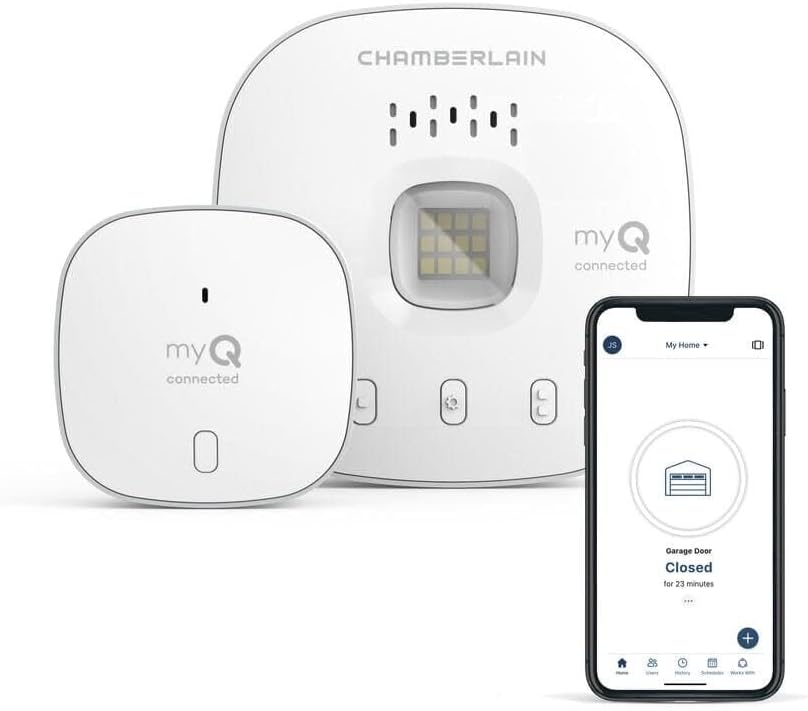
If your opener does not have built-in myQ WiFi, you can add smart control using the myQ Smart Garage Hub (model myQ-G0401). The hub connects to the opener control terminals (same wires as the wall button) and adds WiFi connectivity. The hub is compatible with most major garage door opener brands: Chamberlain, LiftMaster, Craftsman, Genie, Overhead Door, Wayne Dalton, and others manufactured after 1993 with standard safety sensors.
Verify wiring compatibility
The myQ hub connects to the opener using two wires — attached to the same terminals as the wall button. Most openers use a simple dry-contact circuit for the wall button. Some newer openers (LiftMaster Security+ 2.0 with yellow Learn button) use a communication protocol on the wall button wires — the myQ hub is compatible with these. Very old openers with mechanical wall switches (pre-1993) may not be compatible. Check the opener wall button terminals — if there are two screw terminals, the hub should work.
Check for incompatible opener types
The myQ hub does not work with: jackshaft openers that do not have standard wall button terminals, some commercial openers with proprietary control boards, and openers that use a separate transformer for the wall button circuit. Also, if your opener does not have photoelectric safety sensors (required on all openers since 1993), you need to add sensors before the myQ hub works — the hub requires sensors for safe remote closing.
Purchase the correct myQ product
If your opener has built-in WiFi but no myQ: you cannot add myQ — you need the opener brand native app. If your opener has myQ built in: just download the myQ app, no additional hardware needed. If your opener does not have myQ: buy the myQ Smart Garage Hub ($30). Do not confuse the hub with the myQ Home Bridge (for HomeKit) or the myQ garage camera — those are separate products. The hub is the basic smart control device.
Quick Solutions
Still having issues? This is usually the deeper cause below.
If this comes back after following these steps, check whether a recent app or firmware update reset a default setting — the fix works, but the setting gets reverted silently.
Set a nightly auto-close schedule at your usual bedtime so the garage door closes automatically even if you forget. Combine it with a phone notification 10 minutes before so you know it is about to close.
This issue almost always looks more complex than it is — the majority of cases trace back to a single setting, a stale credential, or a default that shipped wrong.
- Opener made before 1993 (likely incompatible)
- Opener lacks a learn button (needs the wired method)
- Wrong pairing method for the opener's technology
- Security+ 2.0 (yellow learn button) needs the wireless method
- Older openers need the door-control-wire method
Before you go — try one of these (they fix most cases).
Most popular upgrades chosen by MyQ Smart Garage Hub owners.
As an Amazon Associate we earn from qualifying purchases.
Official Manufacturer Manual
MyQ provides official product documentation through their online manual rather than downloadable PDF. Access setup guides, troubleshooting steps, and product specifications for your MyQ Smart Garage Hub.
Source: support.chamberlaingroup.com
Need More Help? MyQ Support
Note: The contact information below connects you directly to MyQ's official customer support team, not Trunetto. They can help with warranty claims, device replacements, and advanced technical issues.
Accessories owners commonly pair with MyQ Smart Garage Hub.

As an Amazon Associate we earn from qualifying purchases.
