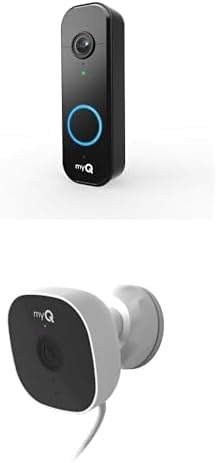
How Do I Set Up the MyQ Video Keypad?
- Keypad on 5GHz / band-steered (needs 2.4GHz)
- Weak 2.4GHz signal at the outdoor mount
- Not in pairing mode during setup
Problem Description
You are setting up the myQ Video Keypad for keyless entry and video monitoring at your garage door. The keypad mounts outside near the garage and provides a PIN code entry, built-in camera, and two-way audio through the myQ app. This guide covers mounting, WiFi setup, and programming access codes.
Why This Happens in Real Homes
The myQ Video Keypad is a keyless-entry device that mounts outside near the garage door, combining a PIN keypad with a built-in camera and two-way audio through the myQ app - so you can let someone in with a code and see/talk to them. Setup follows the myQ pattern: it connects to 2.4GHz WiFi (not 5GHz), and because it's mounted outdoors, often at the far edge of home WiFi, signal reach is the key challenge. Mount it where the 2.4GHz signal actually reaches, and add outdoor coverage with a mesh node if the connection is marginal, or the keypad will pair but keep dropping offline.
Programming access PINs is the other main step - follow the app's sequence to add codes for family members or guests, and confirm the keypad is linked to your myQ account during setup. Make sure it's in pairing mode when you add it and has proper power (or a fresh battery, depending on model). Its camera and two-way audio depend on the same WiFi connection, so a keypad on a weak signal will have laggy or dropping video even when the PIN entry works locally. Keep the firmware current for reliable entry, video, and audio.
Symptoms
- Mounting the keypad outside the garage
- Keypad won't join WiFi during setup
- PIN codes won't program
- No video/audio in the app
- Keypad offline after setup
- Keypad unresponsive to presses
- Two-way audio not working
- Camera view poor or dark
Recognize these? Here's what usually causes it.
Common Causes
- Keypad on 5GHz / band-steered (needs 2.4GHz)
- Weak 2.4GHz signal at the outdoor mount
- Not in pairing mode during setup
- PIN programming sequence not completed
- myQ account not linked
- Power/battery issue
- Firmware out of date
- Mounted where WiFi doesn't reach outside
Most fixes happen in the first 3 steps.
Garage doors are extremely heavy and the springs are under high tension. Never attempt to repair or adjust the door springs, cables, or tracks yourself as this can cause serious injury. Only troubleshoot the smart controller and electronic components. Call a professional for any mechanical issues.
Tools & Requirements
These tools will help you complete this fix.

As an Amazon Associate we earn from qualifying purchases.
Step-by-Step Solution
Mount the myQ Video Keypad outside the garage
The myQ Smart Garage Video Keypad mounts on the exterior wall next to the garage door. It combines a keypad for code-based garage door control, a camera for seeing who is at the door, and a speaker for two-way audio. Mount it at approximately 4 feet height using the included screws. The keypad is weather-resistant and rated for outdoor use. It connects to the myQ hub via WiFi.
Connect to the myQ system
In the myQ app, tap + > Add Device > Video Keypad. Follow the WiFi setup process — the keypad connects to your 2.4GHz WiFi. After connecting, the keypad links to your myQ garage door. The camera feed appears in the myQ app alongside your garage door controls. The keypad backlight and camera activate when motion is detected or the keypad is touched.
Set up access codes on the keypad
In the myQ app, go to the Video Keypad settings > Access Codes. Create codes for family members, guests, and service providers. Each code can be: permanent (works anytime), scheduled (works during specific hours and days), or one-time (works once and expires). Temporary codes are useful for package deliveries, dog walkers, or house cleaners — they enter the code, the garage opens, and the code expires after use.
Configure camera and notification settings
In the myQ app, go to the Video Keypad camera settings. Enable Motion Detection to record clips when someone approaches the garage. Enable Push Notifications for: motion detected, code entered, door opened, and doorbell pressed (if the keypad has a doorbell button). When you receive a notification, tap it to see the live camera feed and talk to the person through two-way audio.
Use the keypad for guest and delivery access
Share temporary access codes with guests via the myQ app — you can text or email a code directly from the app. When a guest enters the code on the keypad, the garage door opens and you receive a notification with a video clip. For recurring visitors (weekly cleaning service), create a scheduled code that works only on their scheduled day and time. Review the activity log to see which codes were used and when.
Quick Solutions
Still having issues? This is usually the deeper cause below.
Camera issues that start suddenly almost always trace back to an upload bandwidth drop — run a speed test before assuming hardware failure.
Set a nightly auto-close schedule at your usual bedtime so the garage door closes automatically even if you forget. Combine it with a phone notification 10 minutes before so you know it is about to close.
Most smart lock failures people label as hardware issues turn out to be a code wiped during a sync, or a setting reset nobody remembers triggering.
- Keypad on 5GHz / band-steered (needs 2.4GHz)
- Weak 2.4GHz signal at the outdoor mount
- Not in pairing mode during setup
- PIN programming sequence not completed
- myQ account not linked
Before you go — try one of these (they fix most cases).
Official Manufacturer Manual
MyQ provides official product documentation through their online manual rather than downloadable PDF. Access setup guides, troubleshooting steps, and product specifications for your MyQ Video Keypad.
Source: support.chamberlaingroup.com
Need More Help? MyQ Support
Note: The contact information below connects you directly to MyQ's official customer support team, not Trunetto. They can help with warranty claims, device replacements, and advanced technical issues.
Accessories owners commonly pair with MyQ Video Keypad.

As an Amazon Associate we earn from qualifying purchases.